Real-time agent awareness
Cocxy understands when an agent is thinking, working, waiting for input, or done.
Native macOS · Local-first · MIT
The terminal that understands AI coding agents.
Real-time detection, inline code review, encrypted Vault, native Markdown, remote workspaces, and zero telemetry.
What makes Cocxy different
The site explains Cocxy on its own terms: visible agent state, local data, and a native macOS app.
Cocxy understands when an agent is thinking, working, waiting for input, or done.
Vault, sessions, configuration, and review state live on your Mac unless you start an explicit action.
Swift, AppKit, SwiftUI, CocxyCore, and Metal support a native workflow.
Works with your whole agent stack
Flagship features
Cocxy combines terminal, review, Vault, browser, Markdown, and remotes without sending your work to a Cocxy backend.
Cocxy detects local coding agents through hooks, OSC signals, terminal semantics, pattern matching, and timing heuristics.
Search, resume, pin, preview, and export local agent sessions without sending terminal history to a remote service.
Review agent changes beside the terminal, comment on lines, accept or reject hunks, and return structured feedback to the session.
A native writing surface with preview, outline, code blocks, diagrams, math, exports, and local file workflows.
Keep pull requests, issues, checks, release pages, and repository context next to the terminal without adding a Cocxy account.
Preview localhost, inspect pages, keep profiles isolated, and place the browser beside terminal panes.
SSH, proxy, relay, daemon, and file-transfer paths are designed as explicit user actions with local control.
CocxyCore combines a Zig terminal core, C ABI, glyph atlas hardening, PTY handling, and Metal rendering for native macOS performance.
Script windows, tabs, agents, hooks, Vault, browser, markdown, remotes, configuration, themes, and diagnostics.
zsh, bash, and fish wrappers preserve user dotfiles while adding cwd, command-boundary, and browser-open signals.
Local plugin hooks extend Cocxy while staying transparent, permissioned, and dependency-light.
Cocxy ships without analytics SDKs, automatic crash upload, required accounts, visitor tracking, or session telemetry.
Demo
The demo shows terminal panes, browser, Vault, and local state without loading third-party scripts.
Architecture
The app separates native UI, domain services, PTY handling, Metal rendering, and the CocxyCore C ABI.
View architecture →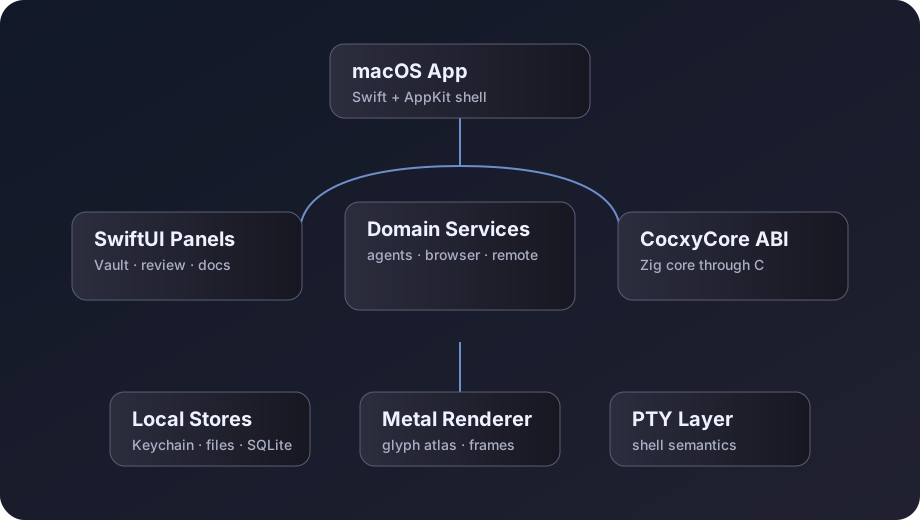
Verifiable privacy
Cocxy ships without analytics, automatic crash uploads, or hidden tracking. Network access exists only for explicit actions such as updates, browser sessions, GitHub, SSH, or plugins.
Read privacy →Key questions
No. The app works locally without a required account.
Not through telemetry. Network access happens only when you open browser, SSH, GitHub, updates, or plugins.
Yes. Cocxy is MIT licensed and the public source can be audited.
Download
The site keeps version placeholders so the release workflow can rewrite them when publishing.
Direct download from GitHub Releases.
Download v1.19.0Reproducible install from the official tap.
brew tap salp2403/tap && brew install --cask cocxyStable, preview, and nightly are documented with clear risk levels.
View channels